
In Science Tokyo LMS, the syllabus integration feature is available only when the syllabus for the subject corresponding to the course is managed in the Web system for S&F.
With syllabus integration, sections and URL resources are created based on syllabus information managed in the Web system for S&F.
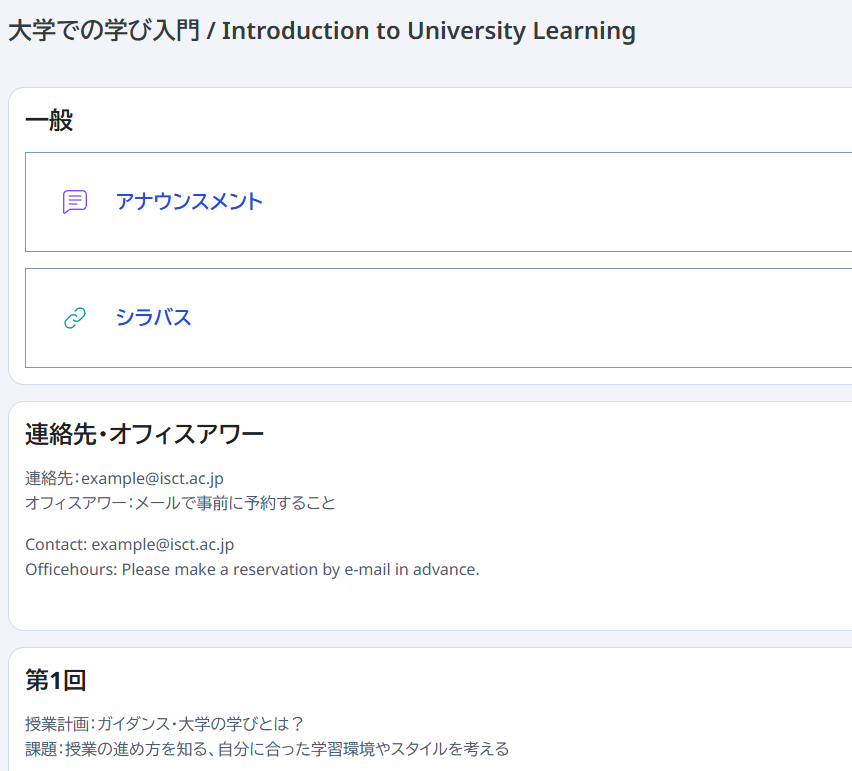
The syllabus integration feature operates automatically according to the setting value of "Overwrite by syllabus integration" for each course.
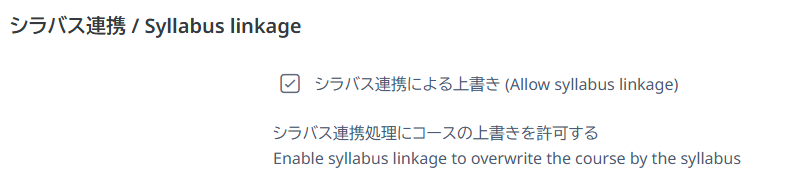
When a course is created, "Overwrite by syllabus integration" is enabled. When the initial syllabus is published, the syllabus information is integrated and topics are created. At the same time, "Overwrite by syllabus integration" is disabled. While it is disabled, the course will not be overwritten even if the syllabus is published or updated again.
You can change "Overwrite by syllabus integration" from the course settings. From the menu at the top of the course screen, select "Settings", then use the "Overwrite by syllabus integration" checkbox in the Syllabus integration block to enable or disable it.
When you change this setting, be sure to click "Save and display".
Important Notes on Using Syllabus Integration
- If you want syllabus corrections to be reflected in the LMS, first enable "Overwrite by syllabus integration" in LMS, then edit the syllabus in the Web system for S&F.
- If you edit the course and add or delete sections before the first syllabus publication, be sure to disable "Overwrite by syllabus integration".
- Syllabus integration overwrites sections from the top in order. If you do not want sections overwritten, or if you have rearranged, inserted, or deleted sections, disable "Overwrite by syllabus integration".