
In the Grading evaluation phase, final grades for the Workshop are calculated.
It calculates the "Grade for submission" (assessment of the submission itself) and "Grade for assessment" (assessment of the assessment itself).
Assessment weight
When an assignment submission has multiple assessors, assessments by assessors with weight are treated as more important.
For example, you may apply weight to TAs but not to students.
If assessment weight is set, the Grade for submission is calculated automatically to reflect the weights.
Assessment weight also affects Grade for assessment.
Assessors who give assessments far from those of weighted assessors receive lower grades. For details, see the Moodle documentation.
Grading evaluation settings
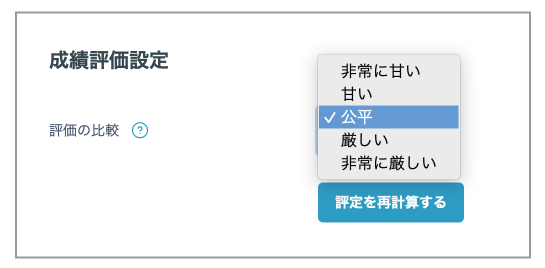
By default, grades given by assessors are used directly as course grades.
The grades of other assessors are affected based on the selected assessor.
- [Fair] Use grades awarded by assessors as they are.
- [Very lax] Give a more lenient grade to students whose grading deviates greatly from the baseline (for example, overly lenient or severe grading), thereby reducing the penalty.
- [Very strict] Give a stricter grade to students whose grading deviates even slightly from the baseline (for example, overly lenient or severe grading), thereby increasing the penalty.
- Finally, click [Recalculate grades].
Grades are reflected in the Peer Review grading report table.
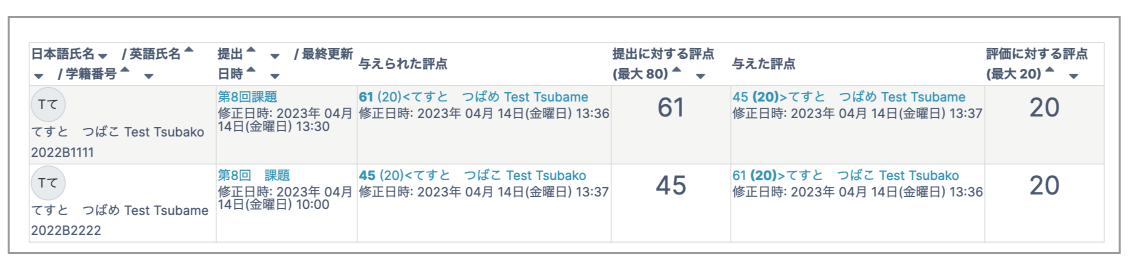
- When ready, click "Skip to the next phase" or "Close Peer Review".
This completes the Peer Review workflow. The submitting students and assessing students each receive grades.