
LMS/MORE provides the Peer Review and Workshop activities, which enable students to review each other's work.
Peer Review is an enhanced version of Workshop with the following improvements.
- It provides an easy-to-read table showing who reviews each student's report and the author of the report each student reviews.
- When downloading submissions in bulk, you can choose between the following two folder structures.
- A folder structure for checking whether each student has sent a review file to another student
- A folder structure for checking the reports assigned to each student
The overall workflow is the same, but this page explains how to use Peer Review.
Workflow
- Setup phase: The teacher configures the assignment content, assessment method, and other settings.
- Submission phase: Submissions are accepted and assessors are assigned.
- Assessment phase: Based on the allocations made in the Submission phase, students assess one another.
- Grading evaluation phase: Peer assessments are checked and grades are finalized.
- Closed: Grades are reflected in Grades.
You can manage progress in a table like the one shown below.
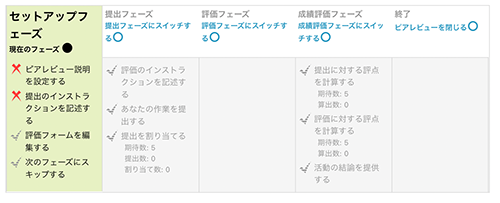
In Peer Review, proceed by clicking the text in this table.