
If you accidentally delete Announcements, first stay calm and check the "Recycle bin".
It may take approximately 15 minutes after deletion before the item appears in the "Recycle bin".
Restoring from the Recycle bin
Click the "..." button for the course from which you deleted Announcements.
Click "Recycle bin".
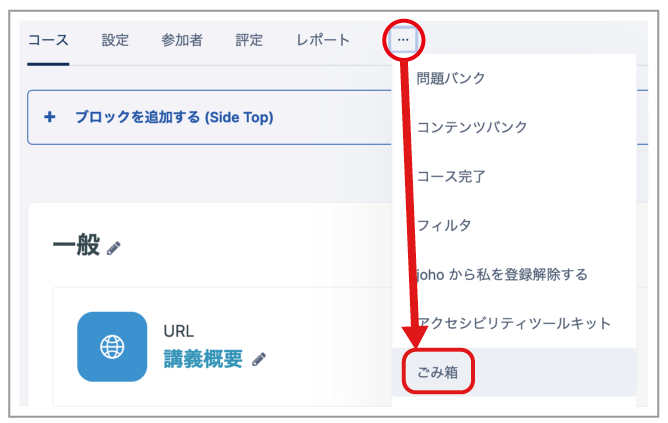
- A list of deleted items appears. Click the arrow-shaped "Restore" button next to "Announcements".

Announcements is restored.
Note: Past posts are also restored.
Importing from Another Course
Items remain in the "Recycle bin" for four weeks after deletion. Even after four weeks, you can restore Announcements by importing them from another course. The procedure is described below.
Note: This method creates a new Announcements forum, so past posts cannot be restored.
- Select "Course reuse" from the "..." button in the course menu.
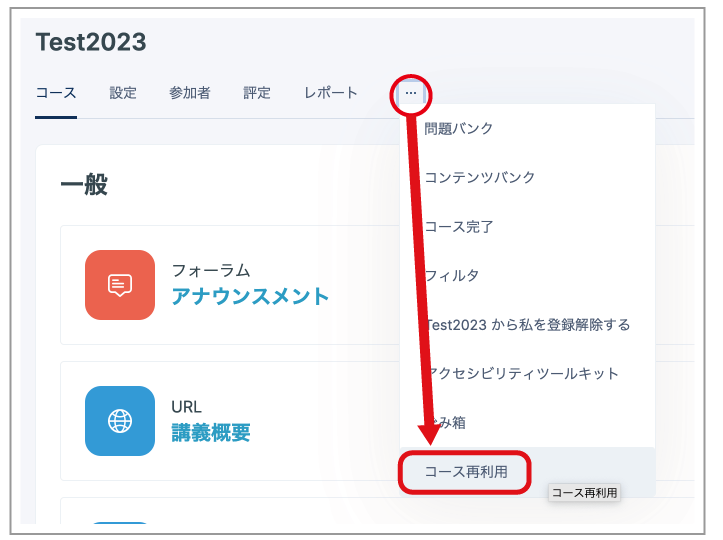
- A list of courses that you teach is displayed. Select any one course, then click "Continue" at the bottom of the page.
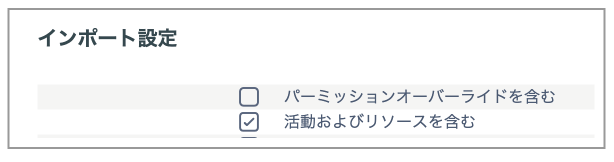
- When the Import settings page appears, select only "Include activities and resources", then click "Next" at the bottom of the page.
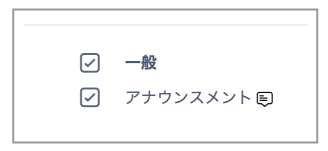
- Select only "General" and "Announcements", then click "Next" at the bottom of the page.
- The confirmation page appears. Check the contents, then click "Perform import" at the bottom of the page.