Students can view one another's posts and comment on them within their groups.
_Note:_ The settings explained in "Making Materials and Assignments Available Only to Specific Groups" restrict which groups can access the Forum itself.
This section instead explains how all students can access a single Forum created by the teacher, while its content (posts) is organised by group.
- Open the Forum in which you want posts to be displayed separately for each group.
- Click "Settings".
- Expand "Common module settings" and select either "Visible groups" or "Separate groups" under "Group mode".
With Visible groups
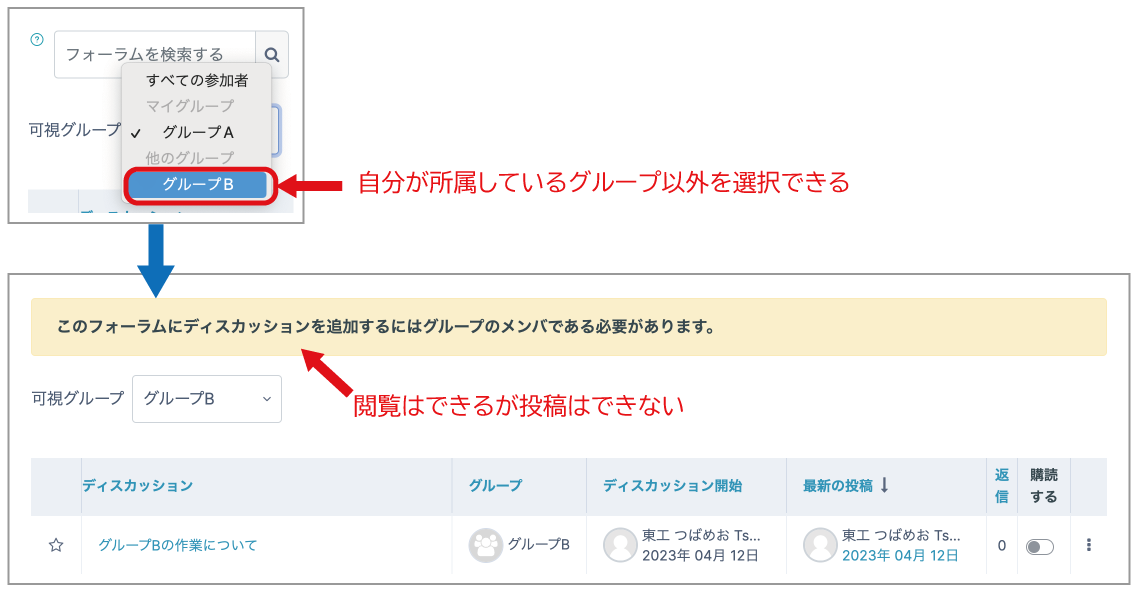
Students can view all posts made by other groups, but they can post or comment (reply) only within their own group.
With Separate groups
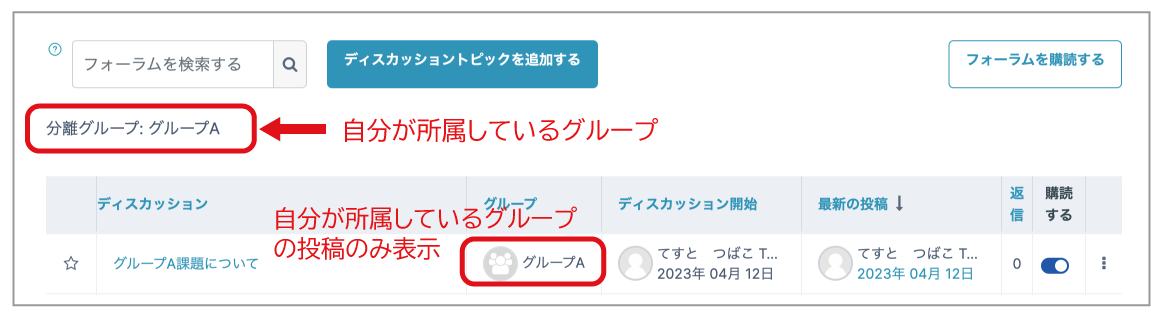
Only posts from the student's own group are displayed. Posts from other groups cannot be viewed and are not visible at all. Students can post and comment only within their own group.
- Click "Save and display".
When students access the Forum, they will see their own group and can view and create posts within that group.
With "Visible groups" selected for Group mode, students can view posts made by groups other than their own, but cannot create new posts or replies there.